 By
By 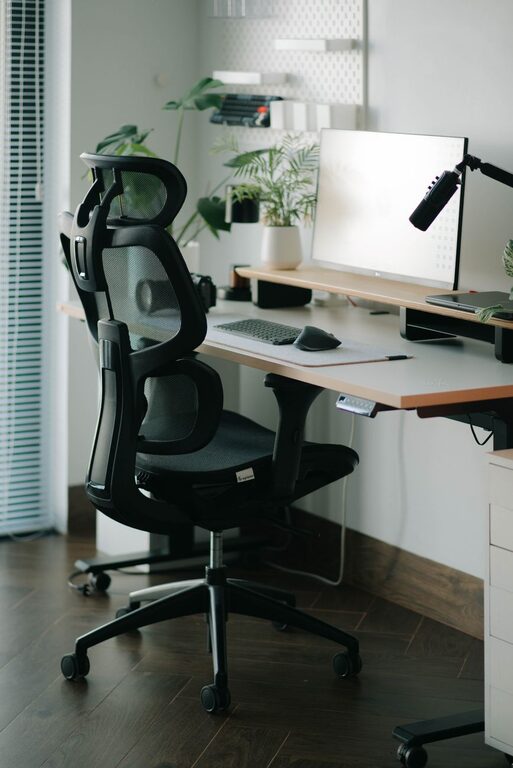
Creating a desk setup that promotes both focus and comfort can make a significant difference in your productivity and overall well-being. Whether you work from home or spend hours at a desk for study or personal projects, having an organized and ergonomic workspace can help you stay motivated and reduce physical strain. In this post, we’ll explore practical tips to design a desk setup that supports concentration and keeps you comfortable throughout the day.
Why Focus and Comfort Matter in a Desk Setup
Before diving into the tips, it’s important to understand why focus and comfort are key. A cluttered or uncomfortable workspace can lead to distractions, fatigue, and even pain, which impacts your ability to work efficiently. On the other hand, a well-thought-out desk setup encourages a productive mindset, minimizes discomfort, and supports better posture and energy levels.
Choose the Right Desk and Chair
Desk Height and Space
Start with a desk that fits your height and provides enough surface area for your essentials. Your elbows should rest comfortably at a 90-degree angle when typing or writing, so standard desk heights around 28 to 30 inches typically work well for most people. If possible, consider an adjustable desk that lets you switch between sitting and standing positions, which can improve circulation and reduce stiffness.
Comfortable, Supportive Chair
Invest in a chair with good lumbar support that encourages an upright posture. Adjustable features like seat height, backrest angle, and armrests allow you to customize the chair to your body. Make sure your feet rest flat on the floor or on a footrest to reduce pressure on your legs.
Optimize Monitor and Screen Placement
Screen Height and Distance
Position your primary monitor so the top of the screen is at or slightly below your eye level. This helps prevent neck strain from looking up or down. The ideal distance between your eyes and the screen is about an arm’s length, roughly 20 to 30 inches. If you use multiple monitors, angle them slightly inward to reduce head turning.
Use a Laptop Stand or External Monitor
If you work on a laptop, using a stand to raise the screen to eye level is critical. Pair this with an external keyboard and mouse to maintain a proper ergonomic position.
Lighting and Environment for Focus
Natural Light and Task Lighting
Place your desk near a window to take advantage of natural light, which boosts mood and energy. Avoid glare on your screen by positioning your monitor perpendicular to windows. Add a desk lamp with adjustable brightness to reduce eye strain during darker hours or on cloudy days.
Declutter and Personalize Thoughtfully
Keep your workspace tidy by removing unnecessary items. A clean desk reduces distractions and helps keep your mind clear. Add a few personal touches like plants, photos, or artwork to create a pleasant atmosphere without overcrowding the space.
Essential Desk Tools and Accessories
Ergonomic Accessories
Consider an ergonomic keyboard and mouse designed to reduce wrist strain. A wrist rest can also provide added comfort. Use a document holder if you frequently reference papers to keep them at eye level instead of looking down repeatedly.
Cable Management
Organize cables with clips, sleeves, or under-desk trays to avoid tangles and create a neater look. This simple step prevents distractions and potential accidents like tripping.
Incorporate Movement and Break Reminders
Take Regular Breaks
No desk setup can replace the benefits of moving periodically. Set reminders to stand, stretch, or walk every 30 to 60 minutes. Movement improves circulation, reduces muscle stiffness, and refreshes your focus.
Use a Balance Between Focus and Relaxation Zones
If space allows, create a small area nearby for quick relaxation, such as a comfortable chair or cushion. Brief mental breaks away from your desk can help sustain long-term concentration.
Maintain Good Habits for Desk Health
Monitor Your Posture
Even with the perfect setup, remember to check your posture regularly. Avoid slouching or leaning forward. Sitting back fully in your chair supports your spine and reduces fatigue.
Stay Hydrated and Nourished
Keep water nearby and drink regularly to stay hydrated, which supports cognitive function. Healthy snacks can also help maintain energy without causing sluggishness.
—
Designing your desk setup with both focus and comfort in mind can transform your work experience. By combining ergonomic furniture, thoughtful organization, and attention to lighting and breaks, you create a space that supports your productivity and well-being. Take time to adjust your setup and habits as needed, and enjoy a more efficient and pleasant working day.